Introduction
Releasing new music every month sounds simple on paper - until real life hits: last-minute artwork changes, missing canvases, rushed masters, distributor deadlines, pitching windows, content that isn’t ready, and suddenly you’re “behind” before the release week even starts. That’s exactly why a monthly cadence needs a system, not just motivation. The goal isn’t to work harder - it’s to make the process predictable, repeatable, and calm.
A waterfall strategy helps because it turns one big “release moment” into a controlled sequence of smaller waves: the single, then the next single, then an EP/album compilation, plus staggered content and follow-up promo that keeps momentum alive without restarting from zero each time. Most modern release frameworks recommend thinking in clear phases - Pre-Release → Release Week → Post-Release -often mapped across an ~8-week cycle per single, scalable to bigger projects. When you plan those phases in advance, you stop reacting and start steering: assets get built early, pitching happens on time, and promotion becomes layered rather than chaotic.
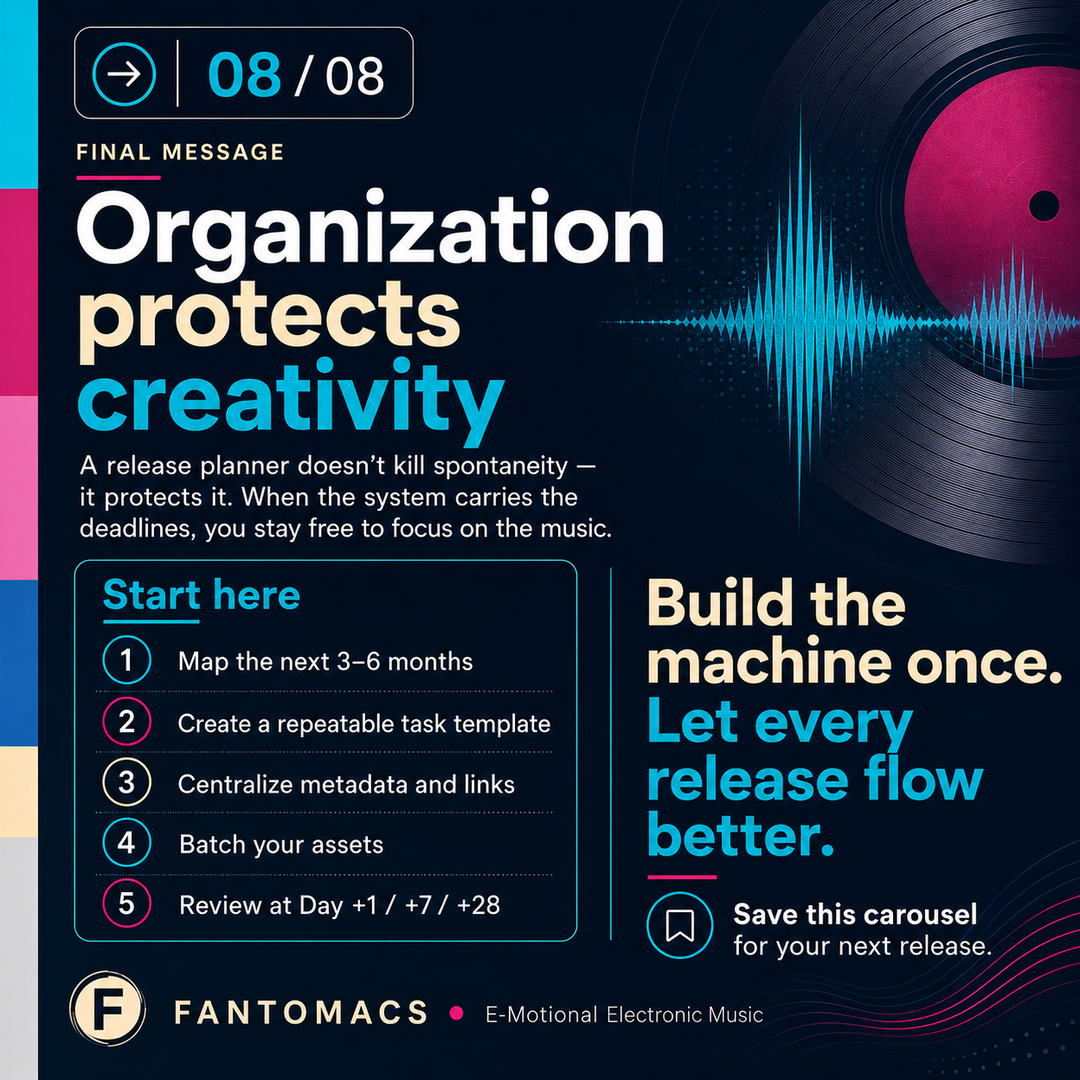
The missing piece for most indie artists isn’t creativity - it’s visibility: one place where tasks, assets, content, and KPIs live together, with deadlines that auto-cascade and a rhythm for review (day +1 / +7 / +28). With a simple release planner or dashboard at the center, you avoid the classic trap of getting stuck on one detail, then feeling overwhelmed when everything stacks up at once. Organization doesn’t kill spontaneity - it protects it, so your release month stays exciting instead of exhausting.
There’s no shortage of “release guides” out there - CD Baby, iMusician, Ditto, DistroKid, Spotify for Artists, YouTube Creator resources, countless blogs and checklists - and most of them explain what to do. The gap is the how : how to implement a monthly release machine from scratch in a way that actually survives real-world distractions and deadlines.
This article zooms in on practical, hands-on experience: the workflows and repeatable processes that consistently produce results (even with limited time), how to set up a simple waterfall calendar, and how to translate vague advice into concrete tasks, templates, and timing windows. We’ll also cover the tools that genuinely speed things up—task boards, file/asset structures, naming conventions, automation helpers, and lightweight dashboards—so you can move fast, stay in control, and ship releases without the last-minute overwhelm.
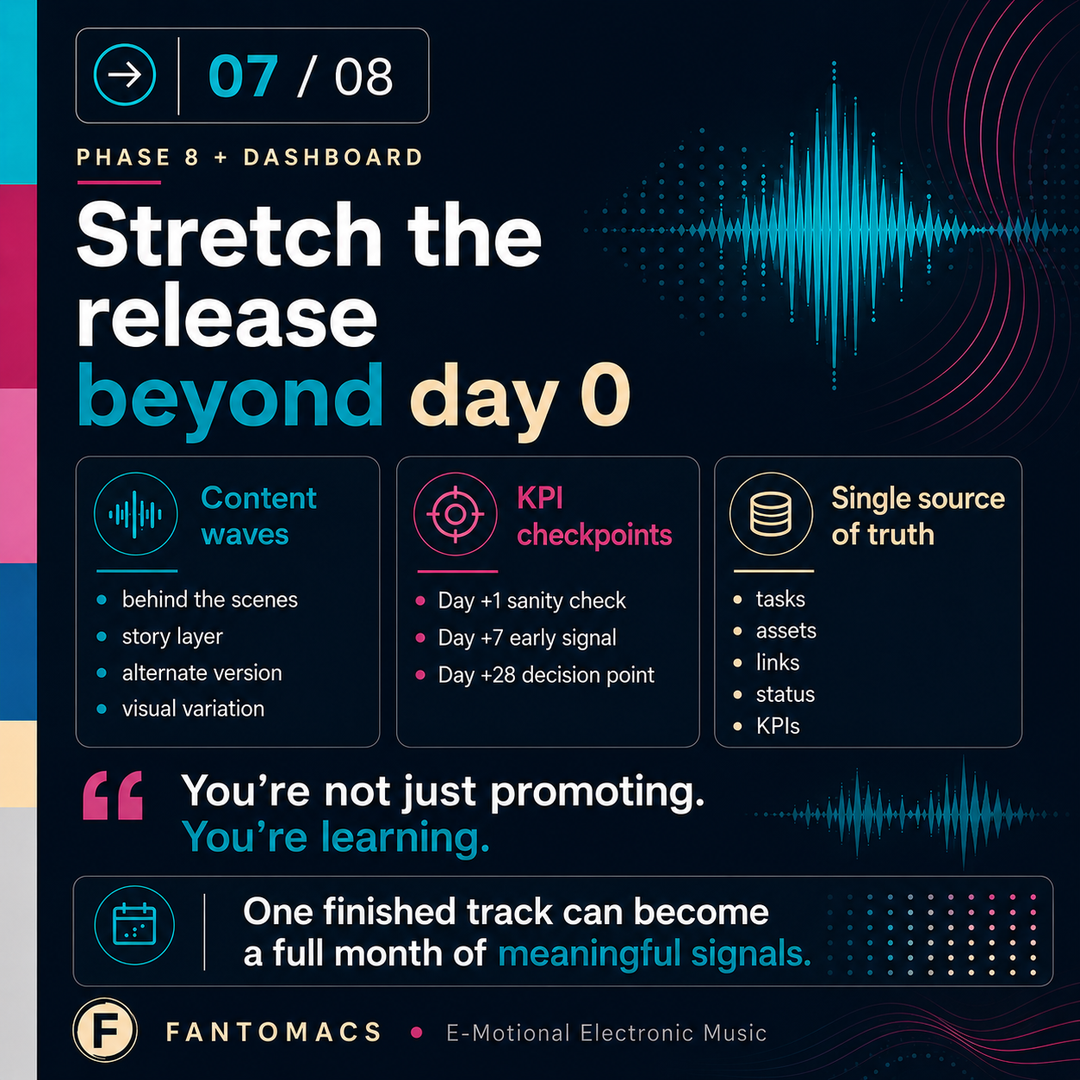
Everything in short


Why Monthly Releases Need a System (Not Willpower)
The Overwhelm Trap: Where artists usually get stuck
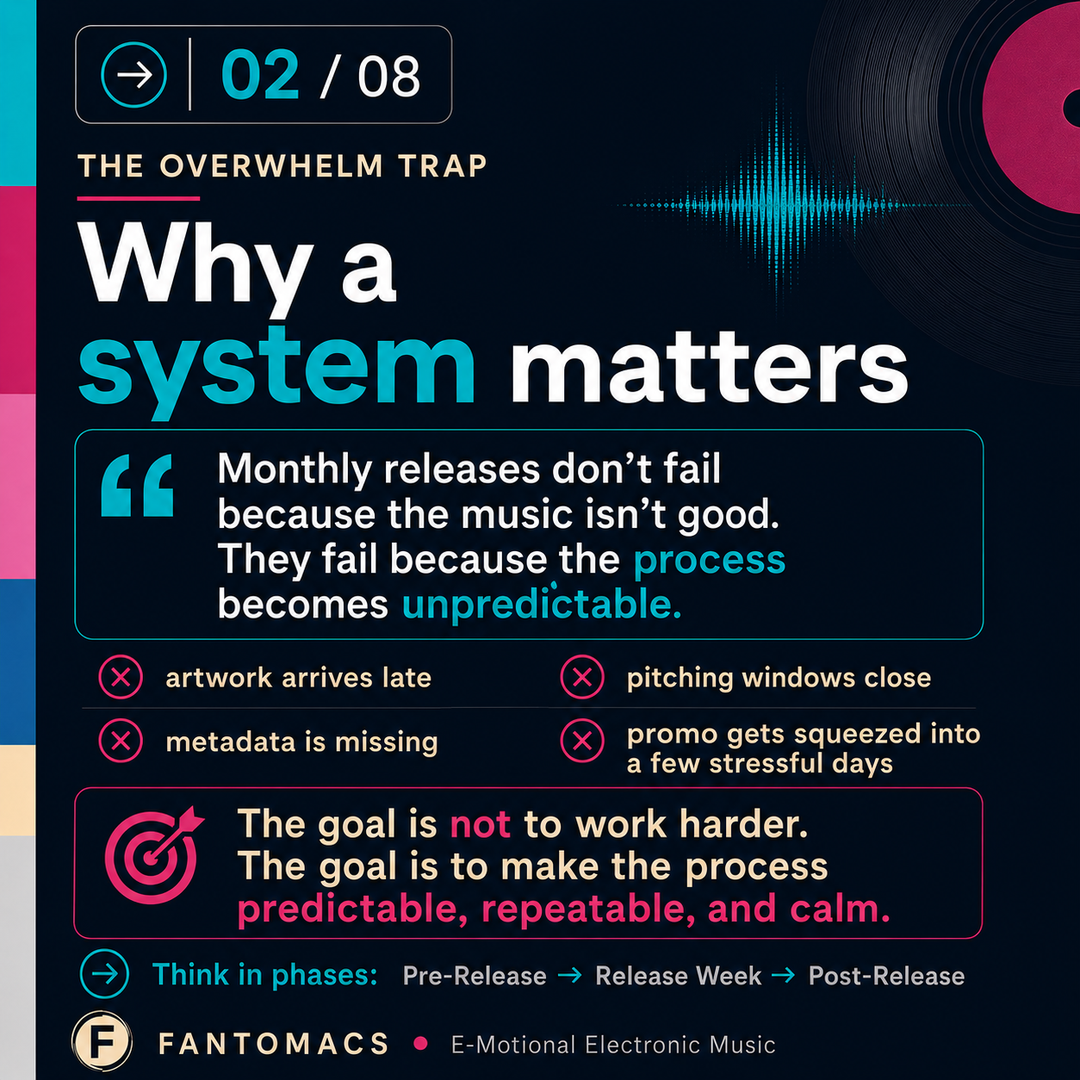
A monthly release schedule is less about “being productive” and more about removing friction. Most artists don’t fail because the music isn’t good - they fail because the process becomes unpredictable: artwork isn’t ready, final masters arrive late, metadata is missing, distributor deadlines are suddenly too close, and promotion gets squeezed into a few stressful days. That’s when a release stops feeling exciting and starts feeling like a burden.
A system fixes that by turning chaos into a routine. Instead of thinking “Release day is coming - panic,” you think in phases. Each phase has a clear goal, a small set of outputs, and a realistic deadline. You always know what “done” looks like, and you always know what the next step is.
Waterfall Thinking: Momentum in waves, not spikes
This is also where a waterfall strategy becomes your best friend. Waterfall doesn’t mean doing more work—it means spreading the right work across time. One song becomes multiple moments: announcement → teaser → pre-save/preview → release → follow-up content → outreach → performance check-ins. When those moments are planned early, you avoid the classic trap: getting stuck perfecting details, then getting overwhelmed because everything else piles up at the end.
The mindset shift is simple:
Your music deserves a reliable delivery machine. Consistency comes from structure, not stress.
Phase 0: Creative Output First (Song Factory Mindset)
Building a monthly writing/production cadence
Before you plan campaigns, assets, and release dates, you need the one thing that drives the entire machine: finished songs (or at least a clear pipeline of songs moving toward “finished”). The biggest hidden risk in monthly releasing is trying to run a release calendar without a stable creative engine. You end up scheduling releases around incomplete music, which forces compromises later.
A practical approach is to treat your creative work like a small “song factory” - not in a cold or mechanical way, but in a way that protects creativity from distraction. The goal is flow: ideas captured quickly, developed efficiently, and only then refined.
My Roland Fantom-EX Workstation is kind of my workhorse for capturing ideas quickly - it is designed by Roland engineers to exactly this purpose: fluent workflows, non-interrupted by changing sounds, switching modes, tempi, loudness and effect settings etc. If I'm travelling, I frequently carry its young brother, Fantom-06, with me allowing later to easily transfer back into the Fantom-EX or directly record, mix and master within Logic Pro X.

Version Control: Sketches - Demos - Finalists
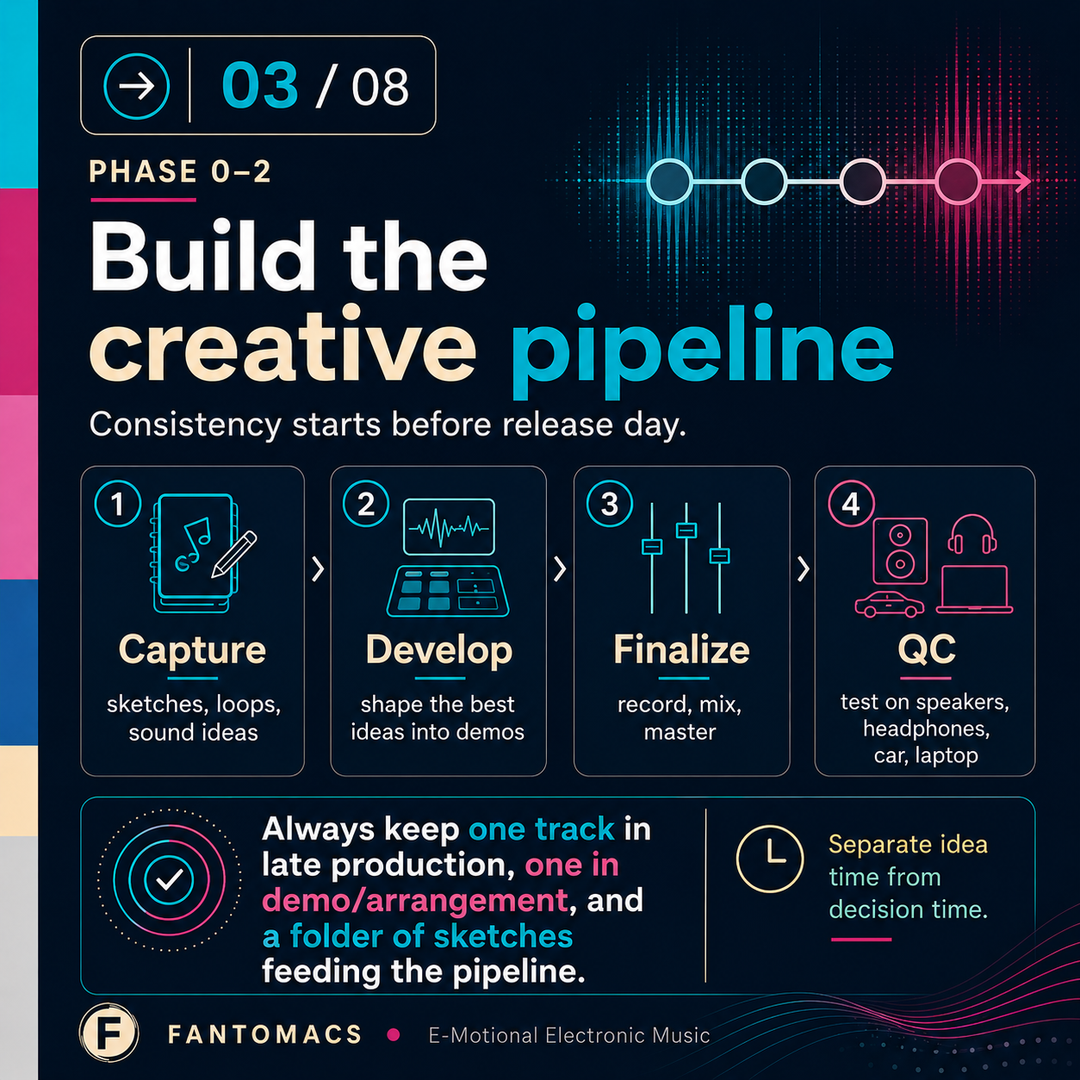
A simple creative pipeline looks like this:
- Capture: quick sketches, loops, chord progressions, beats, sound experiments
- Develop: turn the best sketches into structured demos (intro/verse/drop/outro)
- Select: choose the strongest candidates for the next release slots
- Finalize: move those into production (recording, mixing, mastering)
Creative tools that keep you moving (sound palletes, templates, default chains)
Two habits make this dramatically easier:
1) Keep your sound palette ready.
Instead of rebuilding your sonic world every time, keep a stable set of go-to instruments, patches, drum kits, buses, and default chains. Logic Pro X or any other DAW on the market is fully supporting this idea - any existing Logic file can be transformed with a click of the mouse into a template for subsequent song projects. Another very efficient way of working is to copy the first song project into another version living inside the same Logic project.
For instance, my new "Berlin Nights" project has been structured within Logic exactly like this:
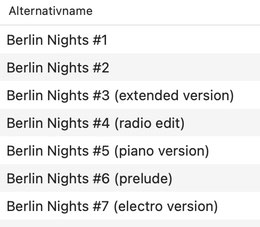
This is how you get that “signature” sound while working faster. It’s also how you stay consistent across a series - exactly what a waterfall strategy benefits from.
2) Separate “idea time” from “decision time.”
When you’re writing, don’t judge too early. When you’re selecting, be decisive. The fastest artists aren’t the ones with fewer ideas - they’re the ones who can move the best ideas forward without constantly reopening old decisions.
If you’re building a monthly release habit, aim to always have:
- one track in late production,
- one track in demo/arrangement,
- and a folder of sketches / unfinished projects feeding the pipeline.
That way, your release process is never dependent on a single song being “inspired into existence” at the last minute.
Phase 1: Production Finish Line (Record - Mix - Master)
Mix Prep: Stems, edits, cleanup, session hygiene
Once a track is chosen for an upcoming release slot, you need to switch from “creative exploration” to “finish mode.” This is where many projects slow down - not because the artist lacks skills, but because there’s no clear finish line. A monthly workflow needs a definition of done.
Think of production like a handoff chain:
Recording / Sound Printing
This is where your track becomes stable. Freeze decisions that don’t need to stay flexible: commit to the main sounds, bounce complex synth chains if needed, clean up edits, and make sure your sessions are organized. The more stable your session, the faster mixing becomes.
Mixing
Mixing isn’t “making it louder.” It’s making the song translate: balance, clarity, depth, groove, and emotion. The practical goal is a mix that holds together at low volume, feels exciting at normal volume, and doesn’t collapse on small speakers.
Mastering handoff or self-master workflow
Mastering
Mastering is the final polish and consistency step - especially important when you’re releasing a series of tracks over months. Even if the songs vary in mood, the perceived quality should stay consistent. A reliable mastering workflow (or mastering partner) helps your monthly schedule remain predictable.
Meanwhile, Logic Pro X (among other DAWs on the market) offers AI-enabled mastering tools residing right in the mastering / sum channel. Alternatively, 3rd party tools (e.g. Ozone 11, Mastering the Mix tools) perfectly assist to master and balance the sound of your track/s in order to make them sound perfect on nearly all audio devices and systems.
Delivery specs checklist (formats, headroom, loudness targets)
The key is to treat this phase like a checklist-driven build, not an endless loop. Give yourself a “finish gate,” for example:
- the arrangement is locked,
- edits are clean,
- levels are sane (no clipping chaos),
- mix feels good on your primary system,
- and you’re ready for proper multi-system quality check next.
When production has a clear finish line, everything that follows - visuals, distribution, promo - can be planned without fear that the music will suddenly shift under your feet. That’s how you stay in control instead of getting stuck.
Phase 2: Quality Control on Real Audio Systems
Reference workflow: headphones, car, small speakers, studio monitors
After recording, mixing, and mastering, you’re not “done” until you know the track translates. Translation means it still feels balanced and emotional outside your studio—on cheap earbuds, in a car, on a laptop speaker, and on a normal living-room system. This is where a monthly release process either stays stable or starts breaking, because last-minute surprises here can destroy your timing.
A practical QC routine is to define a small set of listening environments you trust and repeat every time. For example:
- your main studio monitors (baseline)
- one pair of consumer headphones/earbuds (real-world detail)
- a small mono speaker or laptop speaker (midrange truth)
- a car test (low end + overall impact)
Keep it consistent. The point isn’t to test on 20 systems—it’s to run the same tests each release so you can compare and decide fast. For instance, I'm doing the regular quality controls of the finally mastered mixes on the following systems:
- Adam Audio T7V (studio monitors)
- Apple AirPods Pro 3
- Beyerdynamic DT 770 Pro and DT 1990 Pro
- Apple Studio Display built-in speakers
- Bose S1 Pro PA System
- Bose Soundtouch 10 and Soundtouch 20
- Bose Soundbar 300 (surround system w/ subwoofer and satellites)
- Apple HomePod
- Harman Audio Car Audio (Alfa Romeo)
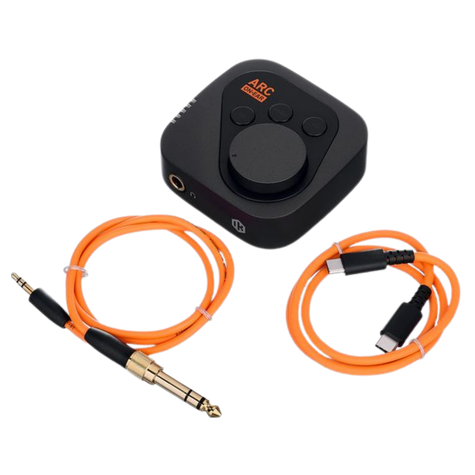
For my mixing and mastering sessions, I'm making advantage of IK Multimedia's ARC ON-EAR and ARC Studio systems.
The first, ARC ON-EAR, is a really innovative unit enabling mixing / mastering with studio headphones without biasing.
The second, ARC Studio, is already known since many years enabling mixing / mastering using studio monitors without biasing by the location of the monitors, their abilities and interfering room reflections.
For a list of my gear, please refer to https://www.fantomacs.de/infos/
Notes Loop: Fix - Reprint - Recheck
QC only works if you capture feedback cleanly. When you listen, don’t “think about changes” - write them down in plain language (e.g. Logic Pro X NotePad or equivalent) and keep them small and actionable:
- “Vocal/lead too loud in chorus on earbuds”
- “Kick disappears on laptop”
- “Hi-hats harsh at high volume”
- “Bass boomy in car around 80–120 Hz”
Then do the loop: fix one batch → export a new version → recheck only the problem spots. The mistake is re-listening to the entire track from start to finish every time, which creates new doubts and slows you down. Recheck what you changed, confirm it’s better, move on.
"Sign-off" criteria
Monthly releases demand a clear “stop rule”. Not because perfection doesn’t matter - but because endless micro-tweaks create schedule risk without real listener benefit. A good sign-off definition is something like:
- No obvious translation problems on your chosen systems
- The track feels emotionally right at low volume and normal volume
- Nothing is distracting or “wrong” (harshness, pumping, clipping, strange imbalances)
- You can listen through without wanting to immediately change something
When you hit that point, "sign-off" the master, archive the final files, and move forward. This is the moment you protect the release calendar.
In practice, I'm doing the "sign-off" by moving the bounced high-resolution MP3 and full-resolution WAV-files into the respective RELEASE FOLDER on my CloudDrive. From there, I later feed the distribution process to the DSPs (digital streaming platforms) via my label / distributor.
Phase 3: Release Strategy & Timing (Song to Schedule)
Choosing Single / EP / Album Path
Once the audio is signed off, strategy becomes simple: what are you building - a sequence of singles, or singles that later become a compilation/EP/album?
For a monthly cadence, singles are usually the core engine because they create repeated touchpoints with listeners and platforms. The compilation/LP/album later is the “bonus wave” that collects the story and gives fans a bigger product moment. The album can also "land" on your physical distribution platform. I'm using ElasticStage for on-demand physical manufacturing of both, CD & Vinyl, sales and worldwide shipping services.
A practical rule:
- If the track stands strongly on its own, release as a single.
- If multiple tracks share a concept, sound, or narrative arc, plan the compilation early - but still feed it with singles first.
This is waterfall thinking: each single is a chapter, the compilation is the book.
Waterfall Calendar: How tracks connect across months
A waterfall calendar is basically a chain: each release supports the next one instead of resetting your marketing to zero every month. That means you plan your sequence intentionally: energy levels, moods, tempos, and themes can “flow” from one release to the next.
A simple approach that works well in practice:
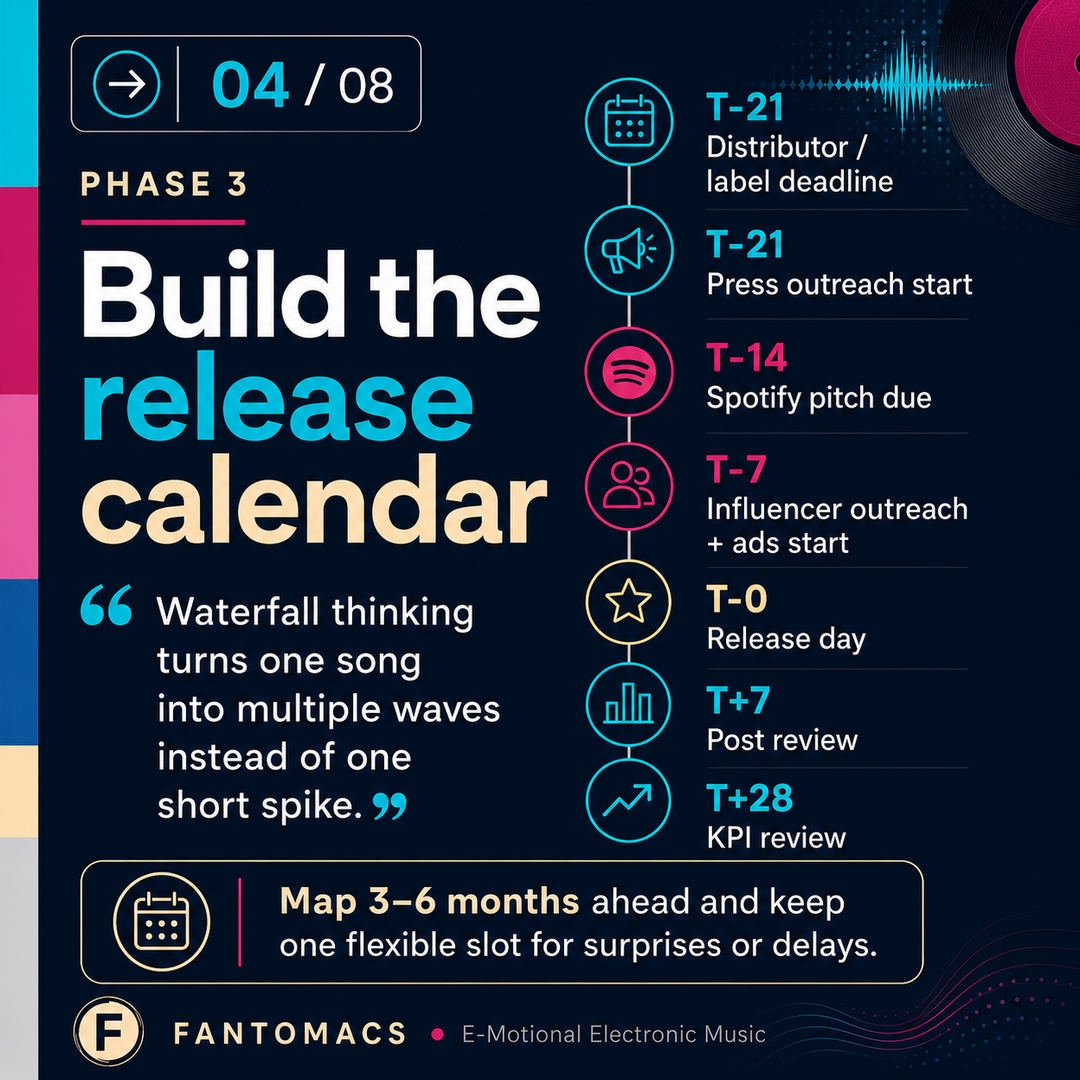
- Map 3–6 months ahead with “tentative” slots (not rigid, but visible)
- Decide the narrative thread (sound evolution, seasonal mood, city/scene theme, etc.)
- Keep one flexible slot for surprises or delays
The huge win here is psychological: when you know what’s coming next, you make faster decisions today - because every decision has a place in the bigger sequence. Another win is that the algorithm of the DSPs are triggered by the regular release scheme.
Key Windows: Distro lead time, pitching, content runway
Timing is where most indie releases get stressed. The fix is to treat deadlines as non-negotiable windows rather than “some day” tasks. In general you want enough runway for:
- Distribution lead time: upload early enough to avoid panic fixes
- Pitching window: time to pitch before release (where available)
- Content runway: enough time to create and schedule assets before release week
The exact numbers differ by distributor and your workflow speed, but the principle stays the same: if content and metadata aren’t ready early, release week becomes damage control. Planning in advance is what keeps your monthly schedule sustainable.
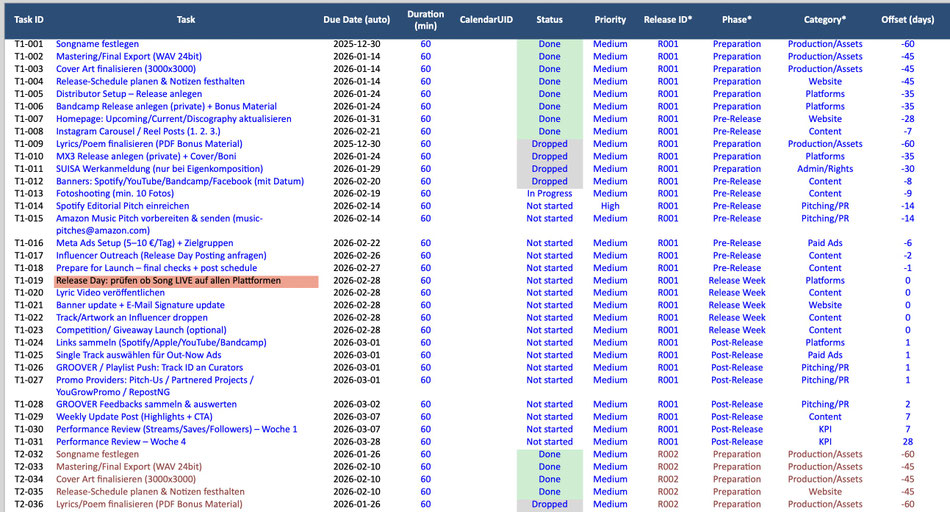
As an example, please find below a screenshot of my Release Planner (Apple Numbers or MS Excelsheet or equivalent), illustrating the Release calendar for 2026:

The Tasks for each Release ID are organized on a separate tab of the spreadsheet. Each Release (R001, R002 ...) has a number of assigned tasks (T1-001, T1-002, ...) and due dates that are automatically calculated based-upon the Release Date that has been assigned on the first tab already. The Status is organized as a popup menu with discrete values to quickly select by a single mouse click.
Phase 4: Brand & Visual Direction for the Release
Defining the visual concept per track and across series
Once audio is locked and the release is scheduled, visuals stop being “nice to have” and become part of the product. For monthly releases, the smartest approach is to design at two levels:
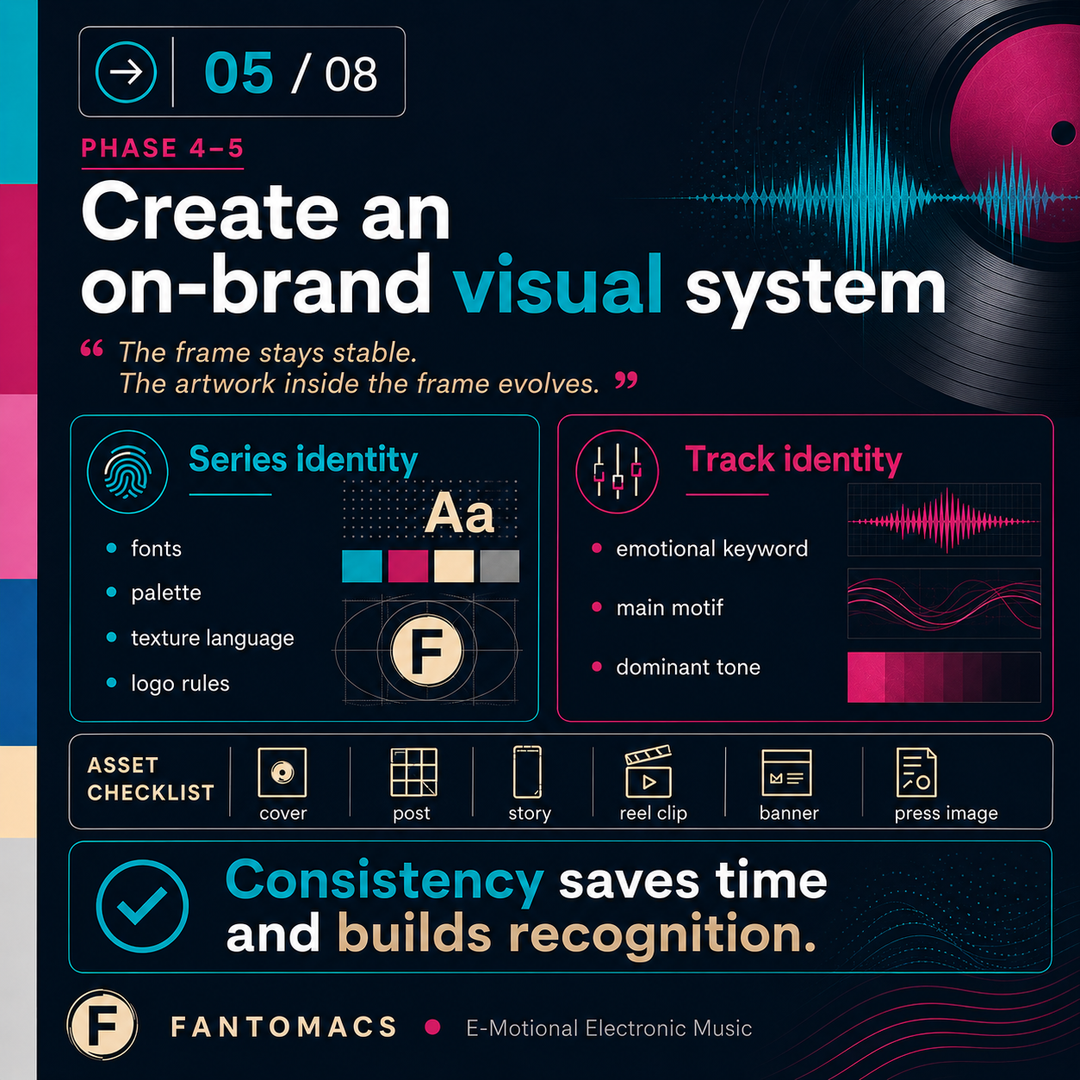
- Series identity (the umbrella look): fonts, colors, texture language, layout rules
- Track identity (the episode look): a unique image or motif that still fits the umbrella
This is how you build recognition over time. Fans should immediately feel “this is part of the same world,” even when each track has its own mood.
A practical starting point is to write a tiny visual brief per track:
- What’s the emotional keyword? (warm / futuristic / nostalgic / nocturnal)
- What’s the main motif? (city lights / ocean horizon / abstract geometry / portrait)
- What’s the color direction? (one dominant tone + supporting neutrals)
Three lines are enough to guide everything that follows.
Consistency rules: Typography, Colors, Logo placement, Mood
Consistency is what makes monthly releases look professional without requiring more work. The trick is to standardize the parts that don’t need to change, so you can be creative where it matters.
Typical consistency rules that save time:
- One or two typefaces maximum
- A defined palette (primary + accent + neutrals)
- A fixed logo placement rule (or a rule for when you omit it)
- Repeatable texture language (film grain, brush textures, clean minimal, etc.)
- Export standards (sizes, safe areas, file naming)
When these rules are clear, you move faster, approve faster, and your content looks cohesive across Spotify/Apple/YouTube/Instagram without re-designing everything each month.
Here, it helps getting organized using Canva (www.canva.com), allowing to define templates and install a brand tab where the color pallet, fonts and sizes, symbols and logos (and much more) can be stored and re-used for all content and projects.
Phase 5: Asset Production Pipeline (Fast, Repeatable, On-Brand)
Required assets list (cover, social, shorts/reels, banners, press image)
Once the audio is signed off and the visual direction is defined, the next step is to produce assets in a way that never turns into chaos. The easiest way to stay calm is to treat assets like a fixed deliverables list you repeat for every release. You’re not reinventing what you need each month - you’re simply creating the next set.
A solid “always needed” list usually includes:
- Cover artwork (square, platform-compliant, clean typography rules if you use text)
- Social formats (square post, vertical story, vertical reel cover)
- Short-form video pieces (teaser loop, release-day clip, follow-up clip)
- Banners (YouTube channel/banner variants if relevant, link-in-bio visuals)
- Press images / promo images (1–3 consistent artist visuals or branded graphics)
The key is not to create more assets - it’s to create the right set reliably, so you always have something ready for each waterfall moment: announcement, teaser, release-day, and post-release.

Templates vs. one-offs: where to standardize
Monthly releasing becomes sustainable when you standardize everything that doesn’t need artistic reinvention. Think of templates as your “production line” - they remove decisions you’ve already made.
A practical split looks like this:
- Standardize: layout grids, typography rules, logo placement, text styles, safe zones, file sizes, naming
- Keep flexible: hero image, color mood shift, one signature graphic element, track-specific motif
This gives you the best of both worlds: speed and consistency, without killing creativity. You’re basically saying: “The frame stays stable. The artwork inside the frame evolves.”
If you work with Canva, this is where Canva shines: you build a small template set once, then duplicate and swap imagery for each release. If you need higher-end finishing (sharpness, masking, lighting, film grain), you do that in a pro tool like Affinity Photo 2 (now for-free part of Canva!) and bring the finished hero image back into Canva.
Approval workflows: drafts - review - final exports
Most release stress comes from unclear approval. You keep tweaking because you haven’t defined what a “final” is. A lightweight approval workflow solves that immediately:
- Draft 1: concept and mood only (does it feel right?)
- Draft 2: refine details (composition, readability, brand consistency)
- Final: lock it, export it, and stop changing it
The practical trick: limit yourself to two review rounds. If you’re a solo artist, the “review” can be your own check against a short list:
- Does it look like part of the series?
- Does it work as a tiny thumbnail?
- Is anything visually distracting or messy?
- Does it match the song’s emotion?
Then you export in one clean batch. This is where naming conventions matter: if your exports are consistently named and stored, your distribution upload and social scheduling become frictionless.
Done right, Phase 5 feels like a conveyor belt: you’re not scrambling to “make content,” you’re simply producing the next release package - fast, on-brand, and ready for the waterfall schedule.
Phase 6: Distribution & Metadata (Where Releases often Break)
Metadata Checklist
This is the unglamorous phase that can quietly derail everything. The music can be finished and the artwork can look perfect- yet a release still gets delayed or published incorrectly because metadata wasn’t ready. The fix is to treat metadata like production: a repeatable checklist you complete early.
Typical “must be correct” items include:
- Artist name + release title + track title (exact spelling, consistent everywhere)
- Credits (writers, producers, featured artists, remixers, label/distributor fields)
- ISRCs / UPC (assigned or requested depending on your setup)
- Release date + original release date (important for compilations/waterfall bundles)
- Artwork specs (size, format, no forbidden elements, clean edges)
- Lyrics (where you publish them; for covers: extra care with correct text)
- Explicit flags (if applicable)
The biggest practical advice: fill metadata once, store it centrally, reuse it. Don’t retype the same info in three different places every month - copy/paste from one “source of truth.” For this, I added a Release DataBase tab to my Release Planner spreadsheet, covering, for instance:
- Running number
- Release Title
- Track name
- Release Type (single / EP / album)
- Type (cover / original)
- Release label / distributor
- Original Release Date
- UPC (GTIN-12/EAN-12)
- GTIN-13 / EAN-13
- ISRC
- Composer/s / Writer/s
- Featured Artists
- Genre (of the distributor / label)
- SUISA / GEMA ID (or comparable platform)
- SWISSPERFORM status (or comparable platform)
- PRO (Performing Rights Organization) Recording IDs (or comparable platform)
Delivery Timeline to Distributors
Monthly releases succeed when distribution is not a “last week task.” Uploading early buys you time for the things that always happen: small fixes, platform checks, artwork swaps, credit corrections, unexpected delays.
A simple working rhythm:
- Audio + artwork + metadata complete → upload early
- After submission: check platform previews / data (where your distributor allows it)
- Keep a small buffer for corrections before release day
If you’re using a waterfall strategy, you also benefit from planning distribution as a sequence: while Release A is out, Release B is already uploaded or in preparation, and Release C is in production. That overlap is what keeps the machine running.
It's much less stressful, by the way, once the body of the compositions / recordings / mixing is already done in Q4 of the previous year, and then rolled-out for the upcoming year. With 9-10 titles it is easy to run a waterfall release strategy across the entire year. This leaves room for mastering sessions, corrections, artwork and promotion activities as well.
In my Release Planner spreadsheet, the following deadlines are calculated automatically from the release date:
- Distributor/Label Deadline (T-21)
- Press Outreach Start (T-21)
- Spotify Pitch Due (T-14)
- Influencer Outreach (T-7)
- Ads Start (T-7)
- RELEASE DATE (T-0)
- Post Review (T+7)
- Post Review (T+28)
Pre-Save / Landing Page Setup and Link Hygiene
Links break more campaigns than people want to admit. A clean release process includes “link hygiene” as a standard step:
- Create your landing page (one link that routes to all platforms)
- Make sure the URLs are stable and don’t change after you’ve posted them
- Use consistent UTM tags (if you track) and consistent naming
- Place the link everywhere once: bio, pinned post, story highlights, newsletter, website
Pre-saves can help, but the real win is focus: one official link, always up to date, always correct. That makes your promo content reusable across the entire waterfall month without constantly editing captions or replacing URLs.
Phase 6 is basically the “engineering” of your release. When it’s handled early and systematically, launch week becomes creative and fun again - because you’re not fighting preventable admin problems at the worst possible moment.
There are plenty of platforms around allowing to create and maintain a landing page that routes to all platforms. One I use frequently is offered by Groover.
Phase 7: Launch Week Execution (Do Less but Right)
Daily Plan
Launch week isn’t the time to “figure things out.” It’s the time to execute a small plan you already prepared. The goal is not to post everywhere all the time—the goal is to create a clean, reliable release moment and then carry the first wave of momentum into the weekend.
A practical rhythm that works for many indie artists:
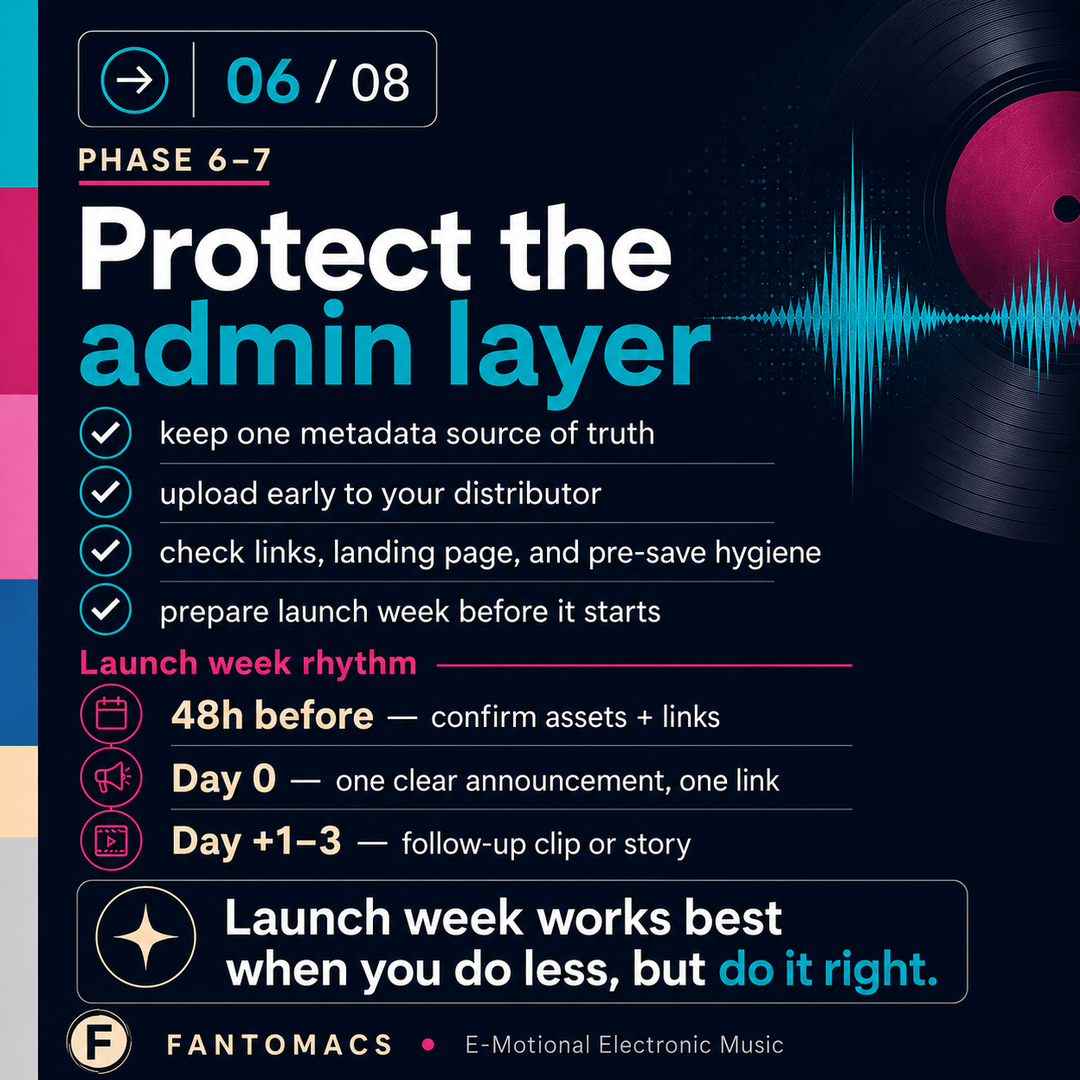
- 48 hours before release:
Confirm everything is live/queued (distributor status, artwork, links). Prepare your release-day post, story, and one short-form clip. If you have outreach messages, finalize them now—don’t write them at midnight.
- Release Day (Day 0):
One clear announcement, one link, one “why this matters” sentence. Keep it simple. Your main job is to make it easy for people to listen immediately.
- Day +1 to Day +3:
Follow up with one additional piece of content that’s different from the announcement (a behind-the-scenes detail, a story about the track, a performance clip, a visual loop). This keeps the release from being a single-day event.
If you do only these steps well, you already outperform most release campaigns - because you’re consistent and readable, not frantic.
Content Stacking
Content stacking means you reuse the same “release message” in different formats without it feeling repetitive. You’re not inventing five new ideas - you’re expressing the same idea in five ways.
A simple stack might look like:
- Short-form video: 10–20 seconds with the strongest hook
- Story: quick “out now” + link + one personal sentence
- Post: cover art or strong visual + short caption + link
- Optional long-form: a blog post, a short note on your website, or a newsletter (if you use one)
The trick is to decide in advance what each format is for:
- Video = emotion + hook
- Story = speed + link
- Post = permanence + credibility
- Long-form = depth + narrative
When each piece has a role, launch week feels manageable instead of like an endless content treadmill.
Coommunity Touchpoints
Engagement is where indie artists often burn out: they try to “be everywhere,” then stop completely. A more sustainable approach is a lightweight routine that you can repeat every month.
For example:
- Reply to comments and DMs in two short sessions per day (morning/evening)
- Pin one comment that gives context or asks a simple question
- Thank people who share the track (a quick DM is enough)
- If you have a small network of supporters, send a personal message to a handful—quality beats quantity
In a waterfall strategy, community touchpoints matter because they keep the release alive beyond day 0. You’re building a relationship, not just collecting streams. Launch week is the moment to be present—but in a way you can sustain every month.
Done right, Phase 7 is surprisingly calm: you execute a few prepared actions, you stay human, and you let the music do its job - while your system protects you from last-minute overload.
Phase 8: Post-Release Waterfall (Turning 1 Track into a Month of Signal)
Follow-up Content Waves
Most indie releases die too early because the artist treats release day as the finish line. In a waterfall system, release day is only the first drop. The real advantage of monthly releasing is that you can keep each track alive with planned follow-up waves - without inventing an entirely new campaign.
Think in “content waves” that are easy to produce and genuinely add value:
- Behind-the-scenes: 1–2 short clips showing a sound, a plugin chain, a synth patch, a vocal take, or a key moment in the arrangement
- Story layer: what the track is about, what sparked it, what changed during production
- Alternate version (optional): radio edit, instrumental, piano version, or a shorter “reel cut”
- Visual variations: new crops, new motion loop, different color grade—same core artwork world
The goal is not to spam. The goal is to create fresh entry points so people can discover the track multiple times in different contexts across the month.
Playlist Outreach Cadence
Outreach works best when it’s paced and specific. Instead of blasting everyone on release day, run a simple cadence that fits your schedule:
- Week 1: priority contacts (the ones most likely to respond) with a short, personal message
- Week 2: second wave (more exploratory contacts), again personalized but lightweight
- Week 3–4: follow-ups only where it makes sense (“Just checking if it fits your vibe”) + sharing one new angle (a video clip, a short story, a notable metric)
Keep your message focused: one sentence about the sound/mood, one sentence about why it fits them, one link. That’s it. If the track gets traction somewhere (radio spins, playlist adds, strong saves), use that as social proof in later waves - but don’t wait for “perfect proof” to start.
KPI Checkpoints
Post-release becomes much easier when you measure at fixed checkpoints instead of obsessing every day. A simple set of checkpoints creates clarity:
- Day +1: sanity check
Are links correct?
Any obvious platform issues?
Did people save/share at all?
- Day +7: early signal
What content performed best?
Any playlist/radio traction?
Where are listeners coming from?
- Day +28: decision point
Is this track worth another push (new clip, new outreach wave)?
Or do you let it settle and focus on the next release?
These checkpoints also feed your next month. You’re not just promoting - you’re learning. Over time, this is how your monthly process gets faster and more effective: each release teaches you what to repeat, what to drop, and what to automate.
Phase 8 is where the system pays off: you turn one finished track into a full month of meaningful signals - without burning out - while the next release is already moving through the pipeline.
The Final Stage: The Release Dashboard (Your "Single Source of Truth")
One Place for Tasks, Deadlines, Assets, Links, Status and KPIs
All information of the RELEASE tab and the TASK tab are combined into a single Dashboard which automatically shows the next 20 tasks on the To-Do-List, Open and Overdue as well as Done tasks for all Releases at a glance.
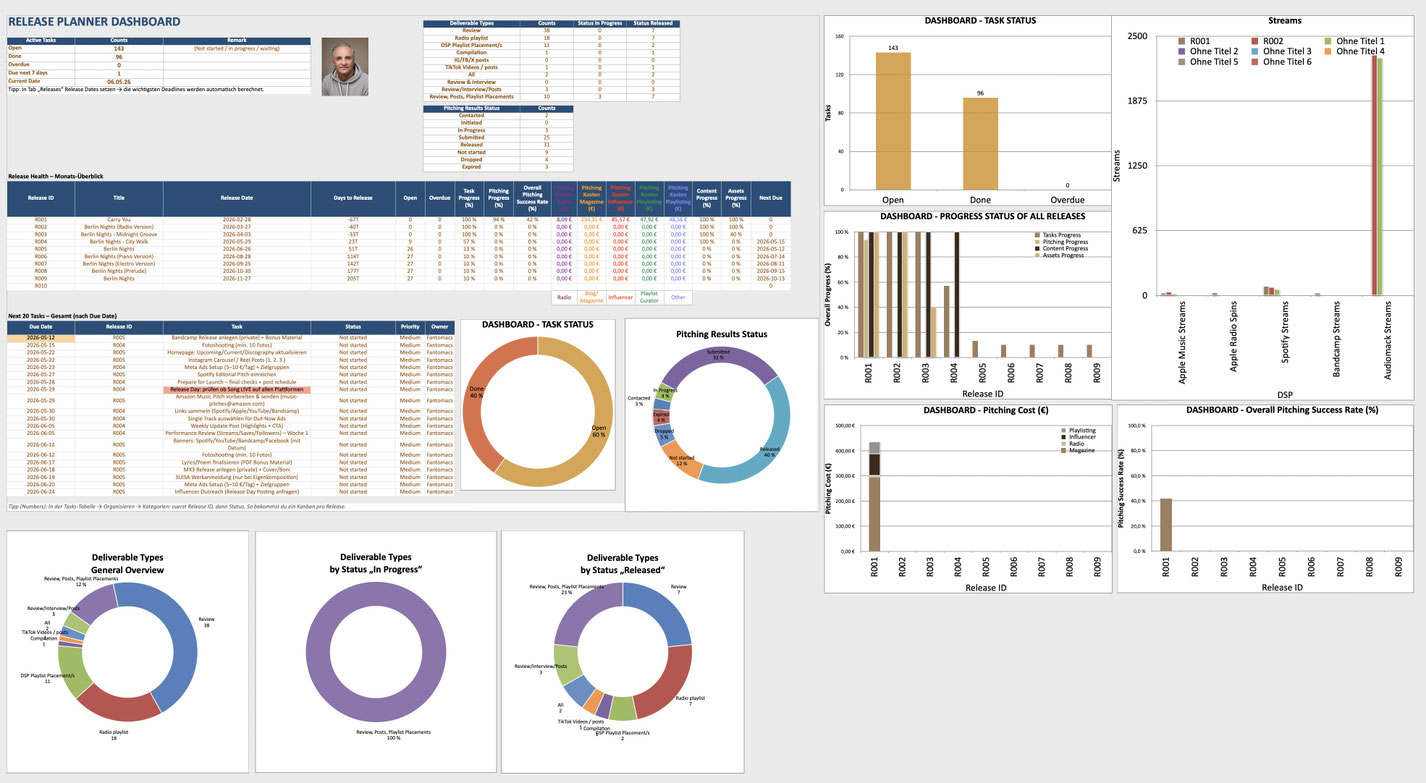
At this point you’ve built a full release machine - from creative pipeline to post-release waterfall. The dashboard is what keeps that machine running smoothly month after month. Think of it as your control room: instead of hunting through folders, notes, emails, Canva designs, distributor pages, and calendars, you have one place where the release is “true.”
A good dashboard doesn’t need to be complicated. It simply answers, at a glance:
- What’s the next release and what phase is it in?
- What’s missing right now (audio, artwork, metadata, content)?
- What are the next deadlines and who/what is blocking them?
- Which links are official and ready to share?
- What happened after release (basic performance signals)?
This single source of truth is what prevents overwhelm - because you always know the current state, and you always know the next action.
Views: Timeline, Next Actions, Asset Readiness, Performance Snapshots
The reason dashboards work is not the data - it’s the views. You don’t want to read a giant table every day. You want a few focused lenses you can switch between depending on what you’re doing.
Typical views that make a monthly workflow feel effortless:
- Timeline view: shows your releases and the phase gates (audio locked, artwork done, upload complete, launch assets scheduled)
- Next actions view: the 5–10 tasks that matter right now (no noise, no backlog)
- Asset readiness view: a simple “traffic light” status for cover, reels, story assets, banners, press images, etc.
- Performance snapshot: day +1 / +7 / +28 checkpoints with just enough KPIs to learn and adjust
If you keep those views clean, your release process becomes “drive-by manageable”: you can check the dashboard in minutes and know exactly what to do.
Automation Basics: Recurring Templates, Checklists, Review Rhythm
The real power move is making the dashboard repeat itself. Monthly releases are repetitive by nature - so you should benefit from that repetition.
The simplest automation principles:
- Recurring templates: duplicate the same release structure each month (same phases, same asset list, same metadata fields)
- Checklists per phase: so you don’t rely on memory when you’re busy
- A fixed review rhythm: for example a quick check 2–3 times per week, plus the KPI checkpoints after release
Over time, this becomes your “release operating system”. You spend less energy coordinating, and more energy creating - because the system carries the complexity for you.
Outlook: Evolved Release Planner and AI-powered workflows
The more evolved Release Planner spreadsheet nowadays has a couple of more functionalities built-in:
- Annual and Monthly Calendar with automatically integrated "Next 20 Tasks" list
- Pitching Spreadsheet for Playlist Curators, Magazines and Radio
- Standardized Content spreadsheet with links to Canva content
- Standardized Assets spreadsheet
- KPI spreadsheet including calculations
- Curator / Playlist contact spreadsheet (sorted by "Tier" categories (importance / reach / followers))
- Music Magazines Contacts spreadsheet (sorted by "Tier" categories (importance / reach / reputation))
- Radio Contacts spreadsheet (sorted by "Tier" categories (importance / location / reach / reputation))
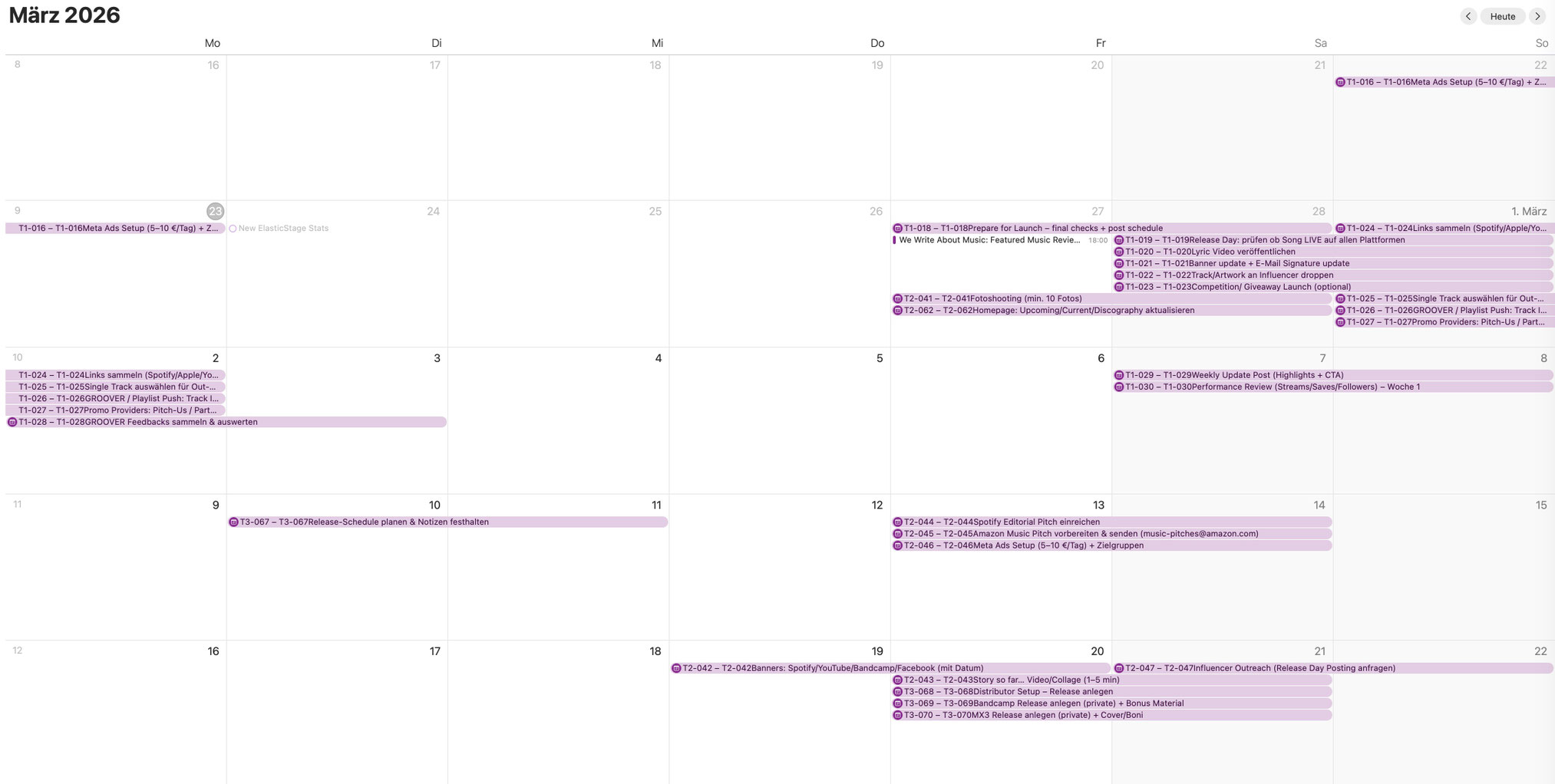
Apple MacOS is offering tools to further automate, for instance, to update the iCal calendar regularly and fully automatically. This can be achieved in Mac OS Sequoia and earlier version via AppleScript, whereas the newer versions from Mac OS26 onwards allow short keys to achieve the same without programming. With that, your iCal calender is able to visualize automatically the next couple of tasks per calendar day:
The upcoming / announced AI-based functions of Mac OS26 (or MacOS27?) can take it even further - SIRI will become the AI-agent of MacOS allowing to combine repeated tasks that normally need intervention of humans. For instance, the design of visuals, content, fotos and texts and their placement into Canva templates etc. could eventually be generated by SIRI in the future. The human is just needed to control / correct / oversee everything - let's see if this becomes reality!
Write a comment